This free Google tool can increase direct bookings with ease


Summary
Google's free booking links put your hotel's own rates next to the OTAs on Google Search and Maps. Here's how to set them up and rank higher.
Free listings of your rates and availability, next to the OTAs, on Google Search and Maps.
Google's free booking links put your hotel's own rates and availability in front of guests searching on Google Search and Maps, at no cost. The idea is more free, organic traffic to your website, which ultimately means more direct bookings.
We took a closer look at how it works and how to get the most out of it for your business.
How it works
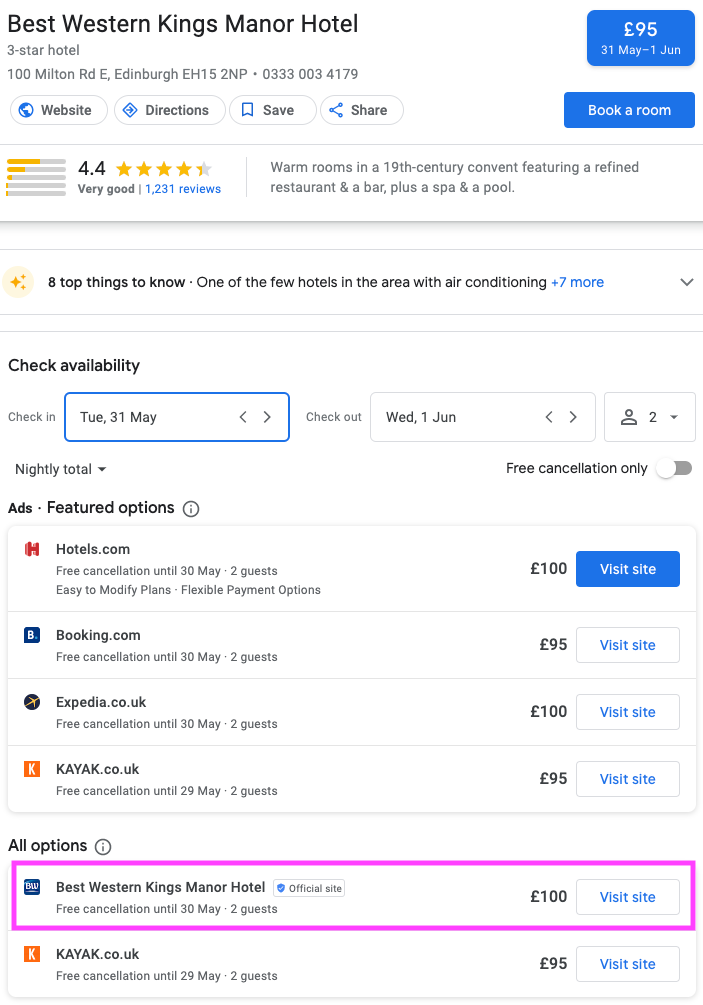
The booking link is added to your Google profile and acts as a free listing of your rates and availability. It appears alongside the paid ads in the booking module (see the example below).
To use the feature you have to be registered with the Google Hotel Centre or use Google Ads.
You choose which landing page the link goes to, and Google extracts room availability and room rates from there.
When customers search for a hotel, they see your own prices next to the OTA offers. They can compare quickly, and book direct from there.
As the Best Western example below shows, the listing includes:
The hotel or property name
The room rate for the selected dates
An 'Official site' badge and logo
Any extras, such as free cancellation or special offers
Tips for a higher ranking
The links are unpaid, so they are ranked by how useful they are to the guest, which makes them a bit tricky to manage.
Some tips to rank higher on the listing:
Offer the best rate when guests book direct
Check that the prices on the listing match those on your landing page
Keep enough availability for your direct bookings
Keep your Google Business Profile updated and as detailed as it can be, with reviews, high-quality imagery and amenities
Provide a user-friendly landing page experience
Also check out the dedicated reporting feature in the Google Hotel Centre. You can see how many people clicked your link, plus impressions and average booking value.
Use those insights to further optimise for direct bookings: improve the landing page experience, review your pricing strategy, and compare against local competitors.
The verdict on free booking links
The biggest bonus is that the feature comes at no cost. It does not involve much work to set up, and it can genuinely help increase direct bookings.
It lets hotels convert guests early in their search and buying process, and you get access to the guest data to use for future marketing that builds guest loyalty. It is definitely worth setting up.
Reach out to find out how you can use the guest data you collect to create personalised marketing campaigns that convert.
See it running on your venues
One unified guest record across Wi-Fi, bookings, reviews and loyalty, and the marketing that acts on it.